Every business eventually hits the same wall: growth brings more orders, more customers, more data, and more repetitive work — but not necessarily more hours in the day. Teams end up buried in manual data entry, follow-up emails, invoice reconciliation, and status updates instead of the work that actually moves the business forward.
AI automation is how growing businesses break through that wall. It’s not about replacing people — it’s about removing the repetitive, rule-based work that slows them down, so your team can focus on decisions that need human judgment.
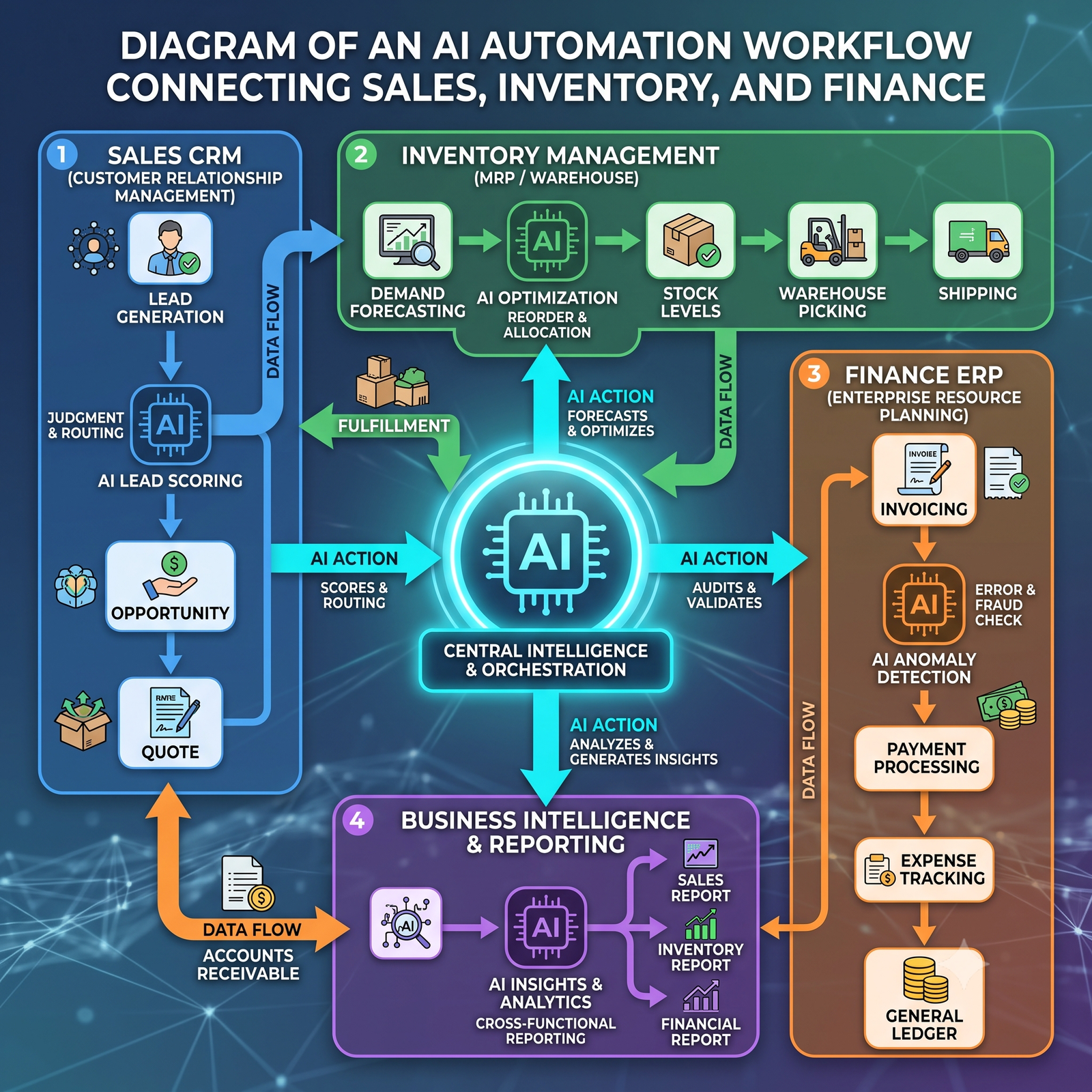
What Is AI Automation in Business?
AI automation combines traditional workflow automation (rules-based, “if this happens, do that”) with AI models that can read, reason, and make decisions — like understanding a support query, categorizing a document, or flagging an anomaly in a dataset.
The practical difference: automation alone can move an invoice from one folder to another. AI automation can read the invoice, extract the right fields, check them against your purchase order, and flag anything that doesn’t match — with no one touching a keyboard.
Key Areas Where AI Automation Drives Efficiency
AI automation tends to deliver the fastest, most visible wins in a handful of areas:
- Data entry & document processing — extracting and validating data from invoices, forms, and contracts automatically instead of manual re-typing.
- Customer support — AI chatbots and smart ticket routing that resolve common queries instantly and hand off complex ones to the right person, with full context attached.
- Inventory & supply chain — demand forecasting and automated reordering that reduce both stockouts and overstocking.
- Finance & invoicing — automated reconciliation, expense categorization, and payment reminders that shrink the time between billing and getting paid.
- HR & recruitment — resume screening, interview scheduling, and onboarding workflows that free up HR teams for the parts of the job that need a human touch.

Real Business Benefits
The appeal of AI automation isn’t the technology itself — it’s what it frees up for the business:
Lower operational costs. Fewer manual hours spent on repetitive tasks means your team’s time goes toward higher-value work instead of data cleanup.
Fewer errors. Manual data entry and repetitive admin work are where mistakes creep in. AI-driven processes apply the same rules and checks every time, which cuts down on costly errors and rework.
Faster turnaround. Tasks that used to take a person hours — reconciling accounts, sorting support tickets, generating reports — can happen in minutes, which means faster decisions and faster response times for customers.
Room to scale. When your processes aren’t tied to headcount, growth doesn’t automatically mean hiring at the same pace. Automation lets your operations scale ahead of your team size.
More focus for your people. Automation doesn’t just save time — it changes what your team spends that time on, shifting them from repetitive admin toward strategy, relationships, and problem-solving.
Curious what this looks like in practice? Browse our case studies to see how businesses like yours have put AI automation to work.
How AI Automation Works With Your Existing Systems
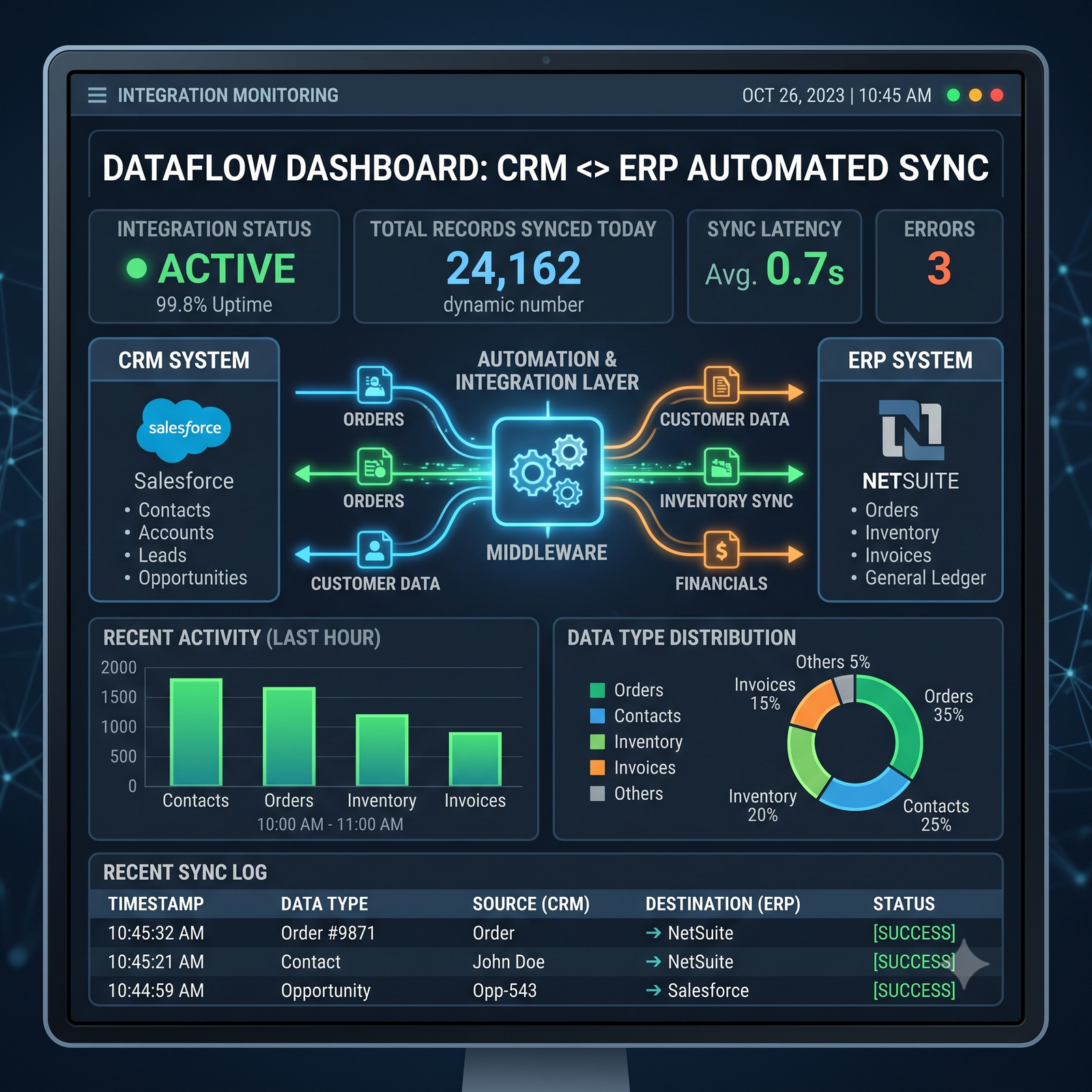
One of the biggest misconceptions is that AI automation means ripping out your current tools and starting over. In practice, the most effective automation sits on top of the systems you already use — your ERP, CRM, and BI dashboards — connecting them so data flows automatically instead of being copied between them by hand.
For example, an automation layer can pull sales data from your CRM, update inventory in your ERP, and refresh your BI dashboard in real time — all without a single manual export or copy-paste. The result is a business that runs on live, accurate data instead of end-of-week reports.
Common Challenges — and How to Overcome Them
AI automation isn’t a plug-and-play switch, and it’s worth going in with clear eyes:
- Unclear processes. Automating a messy, undocumented process just automates the mess. Map the process first, then automate it.
- Data quality issues. AI automation is only as good as the data behind it. Clean, consistent data matters more than a flashy tool.
- Change resistance. Teams sometimes see automation as a threat rather than a time-saver. Framing it around removing tedious work — not replacing people — makes adoption smoother.
- Over-automating too fast. Trying to automate everything at once usually backfires. Starting with one high-friction process and expanding from there tends to work far better.
Getting Started: A Practical Roadmap
- Identify your biggest time-drains. Look for repetitive, rule-based tasks that eat up disproportionate time — that’s usually the best starting point.
- Map the process end-to-end. Understand exactly what happens today before automating it.
- Start with one workflow. Prove the value on a single process before expanding automation across departments.
- Connect your systems. Make sure your ERP, CRM, and reporting tools can talk to each other — this is where most of the real efficiency gains come from.
- Measure and iterate. Track time saved, error rates, and turnaround time, then use that data to decide what to automate next.
FAQs
Is AI automation only useful for large enterprises? No — some of the biggest relative gains happen at small and mid-sized businesses, where a small team is often doing the manual work of a much larger one.
Will AI automation replace my team? The goal is to remove repetitive, low-value tasks, not people. Most businesses find their team shifts toward higher-value work rather than shrinking.
How long does it take to see results? Simple workflow automations (like invoice processing or ticket routing) can show measurable time savings within weeks. Larger, system-wide integrations take longer but compound in value over time.
Ready to automate the repetitive work slowing your business down? Talk to VIXAI about an AI automation solution built around your existing systems.